Office 365 “Send Mail As” Issues with Proofpoint and Gmail
September 13, 2025
Office 365 accounts protected by Proofpoint via GoDaddy fail Gmail SMTP authentication, even with MFA, app passwords, and SMTP enabled everywhere.

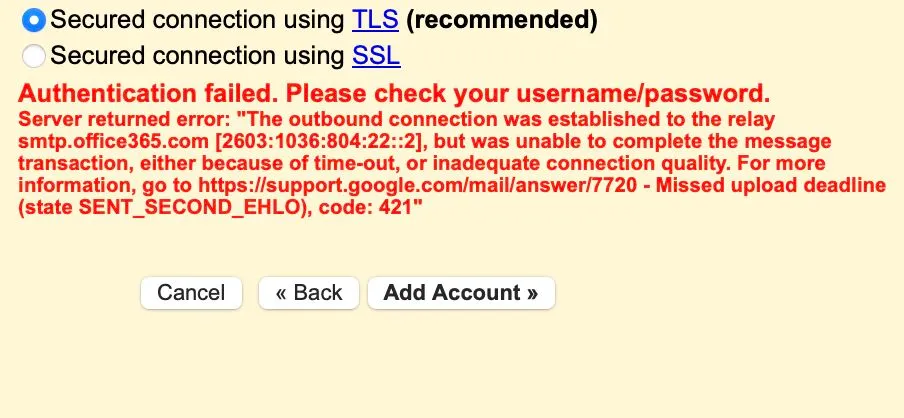
Office 365 accounts protected by Proofpoint via GoDaddy fail Gmail SMTP authentication, even with MFA, app passwords, and SMTP enabled everywhere.
Experiencing difficulties with connecting an Office 365 address, which has the Proofpoint solution enabled via GoDaddy, to Gmail using the 'Send mail as' feature. Neither mx1-us1.ppe-hosted.com nor the regular Microsoft SMTPs such as smtp.office365.com or smtp-mail.outlook.com are working. SMTP is enabled everywhere - GoDaddy, Office 365 Admin, Proofpoint, and MFA is disabled. Enabling MFA and generating an app password didn't help either.
Is anyone aware of a potential solution? Should I enable conditional access in Entra (this was one of the suggestions I found on Google)...? Any suggestions would be appreciated as I've spent 6+ hours trying to solve the issue.